FM-1 firmware · 1.0.2
386DX
A singing karaoke robot with a band: it sings karaoke songs or typed lines to the notes you play, backed by keys, bass and drums.
- Made by
- seajaysec
- Released
- October 19, 2026
- Install
- On the FM-1 Firmware Hub · source on GitHub
- Scan
- Scanned, nothing harmful found · Nov 1 What we checked
- Last checked
- November 1, 2026
What 386DX does
- 386DX makes the FM-1 a singing robot that performs karaoke lines to notes you play on its keys.
- You type lyrics on the keys, then press REC and play one note per syllable to give the line its tune.
- Keys, Bass and Drums back the voice, each bar playing one of sixteen 16-step patterns you edit on the white keys.
- Bass offers deep sub, acid squelch, reese, FM growl, pluck bass, wobble, boom and fat saw, with six drum kits.
- Sixteen punch-in effects sit under the white keys, from lo-pass and crush to brrrs, reverse, chop, ring mod and half time.
- Change lets you shift, pitch and weave patterns together while the song plays, with undo and redo under HOME.
- A companion web page connects over USB to fill the slots with standards or imported karaoke and MIDI files.
Its modes
- Sing
- Watch the robot's face move with the voice and see the words light up as they are sung.
- Song
- Arrange the rows of the song, choose each row's line and write notes for the words.
- Steps
- Edit the selected backing track's 16-step pattern for a bar on the white keys.
- Sound
- Pick and shape the selected track's sound, voice character, bass and keys engines, or a drum kit.
- Envelope
- Set the sound in time: attack, release, filter, and the Voice's glide and vibrato.
- Effects
- Dial reverb, tape echo, drive, squeeze, pump and filter, and punch in sixteen effects on the white keys.
- Mixer
- Set each track's level, reverb and echo, and mute tracks with the black keys.
- Setup
- Set tempo, length and meter, and load, save, rename or start songs in the eight slots.
- Change
- Shift, pitch or weave the bar's pattern for the selected track while the song plays.
What Les checked
386DX v1.0.2Scanned November 1, 2026
What we checked for
- The file is exactly the one its author published
- It's the same file we saw when this release first came out
- It opens cleanly as an FM-1 firmware, nothing damaged
- It doesn't show up on your computer as a keyboard, mouse or other input device
- It doesn't show up as a USB drive or network adapter
- Its text mentions no computer command tools, like PowerShell, Terminal or a download command
What we found
- MIDI and audio, as expected
StatusScanned, nothing harmful found
Each firmware is its author's. Back up first, and install at your own risk. How Les scans firmware
Invite-only
Ask Les about your own setup
Say what you want to make and what else you use. Les gives you steps for your own gear, one at a time, and says why each one works.
To get an invite: leave your email, then join the Les Discord.
You’re invited to the FM-1 beta.
Free for testers.
 How to use grooves in Ableton 120:42 · 4 STEPS
 How to use the arpeggiator0:37 · 4 STEPS
 How to make a deep bass0:38 · 4 STEPS
 How to make an evolving pad0:44 · 4 STEPS
 How the Mod Matrix works0:39 · 3 STEPS
 How to morph between two versions of a pad0:40 · 4 STEPS
 How the two wave knobs on a PolyBrute oscillator work0:42 · 4 STEPS
 How to add swing0:34 · 2 STEPS
 How to change the bells on the FM-1 AMB-10:36 · 3 STEPS · AMB-1
 How to turn the FM-1 AMB-1 into a drone0:37 · 3 STEPS · AMB-1
 How to steer the melody on the FM-1 AMB-10:36 · 3 STEPS · AMB-1
 How to use the arpeggiator0:41 · 4 STEPS · STOCK
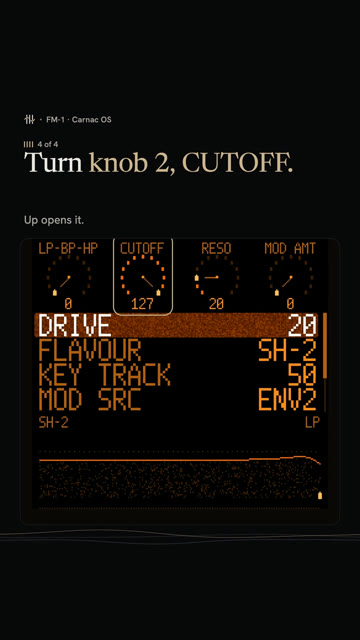 How to sweep the pad's filter in Carnac OS0:43 · 4 STEPS · CARNAC OS
 How to play a dominant 7th on the FM-1 with ChoralRoot0:33 · 3 STEPS · CHORALROOT
 How to play minor 9th chords with one finger on the FM-1 with ChoralRoot0:37 · 3 STEPS · CHORALROOT
 How to play a I-vi-IV-V on the FM-1 with ChoralRoot0:39 · 4 STEPS · CHORALROOT
 How to get the Casio CZ sound on the FM-1 with Melodee0:34 · 3 STEPS · MELODEE
 How to get a Prophet-5 sound on the FM-1 with Melodee0:40 · 4 STEPS · MELODEE
 How to record without quantize on the FM-1 with Melodee0:28 · 2 STEPS · MELODEE
 What every FM-1 control doesPick the firmware on yours, then tap any control to see what it does.
Stock V16Baud Girl 101Felucca v1.6.1SLOOP v2.7.1X0X v1.1.0JIANT v0.7.4-de2a4cbMelodee v1.4.1FoMni v0.4AMB-1 v1.2ChoralRoot v0.24GHOULBOX ghoulbox-v2.1M-VAVE FM-1 Open V12FM-106 Beta4Hortator drum-v0.16.0OberVave v1.4.2Polly v0.4.3Skiff v1.2sloopDX 4.0Rainbow Mode 1.1.5-rbDUELL beta v0.2.20-betaFiMba-1 beta v0.6.1MAKU maku-v1.0Fart Machine One V1.0.0fm1-chord v0.3SLOOP DX7 Banks v2.5-b28-testFuMi-1 fumi-1.0.7Jangada v1.0.1WaveLoop FM-1 1.0.5.2-midi23ORBIT v0.7.1SLOOP Floyd FM v2.4winampFM Synth v0.12Bubba Machine (beta) v0.8.0-betaFelucca [Salt] v0.9-salt14PIGEON v0.3.1FM1 Move 0.3.1FM1 Quest quest-38Groove OS 1.4Carnac OS v0.9.6
Printable panel labels for each firmwareSwitch firmware without losing your work How to add glide to one step0:38 · 3 STEPS
 How to play a random sequence0:28 · 2 STEPS
Les is independent and not affiliated with M-VAVE or the firmware authors. M-VAVE and FM-1 are trademarks of their owners.